


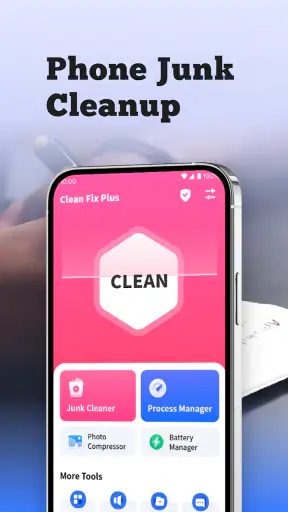




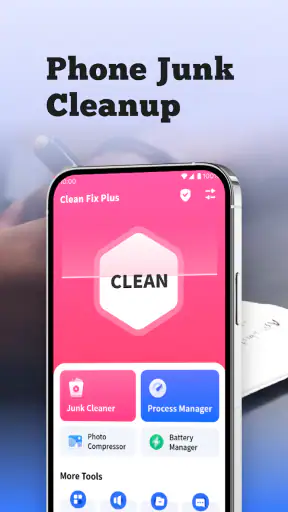


I installed Clean Fix Plus expecting a straightforward storage-cleanup tool, and that is exactly where its appeal lies. It is a free utility from AppDustBuster for finding and removing junk files that are no longer useful, without trying to become a full phone-management suite. My overall view is positive: it is most convincing when you want a simple cleanup session and do not want to sort through folders manually. It is less compelling if you already understand Android storage tools well or want detailed control over every file before deleting it.
The app sits in the Tools category and has built a sizeable audience, with over five million installs and a 4.5 average from around 78 thousand ratings. Those numbers do not replace personal testing, but they do suggest that the basic idea is easy for many people to understand. The Everyone age rating also fits the app’s practical purpose. There is no complicated learning curve in the central task: inspect what can be removed, decide what looks unnecessary, and reclaim space.
What Clean Fix Plus does well in everyday use
The strongest part of the experience is its focus. Instead of presenting a long list of unrelated phone features, Clean Fix Plus concentrates on unwanted files. That makes it approachable for someone whose phone has gradually filled up with temporary material, leftover downloads, or items they no longer recognize as useful. I found that focus more comfortable than using a broad “optimizer” that mixes storage cleaning with battery claims, performance promises, notifications, and other distractions.
The useful question is not whether a cleaner can magically make every phone faster. It is whether it can help me identify disposable material without making the process feel risky. Clean Fix Plus works best in that narrower role. I would open it when storage is becoming uncomfortable, review the cleanup results, and treat the deletion step as a deliberate maintenance task rather than a one-tap cure for every phone problem.
That distinction matters because junk files are not the same as personal files. A photo, an offline map, a downloaded document, or a message attachment may be large, but size alone does not make it disposable. A good cleanup habit starts by separating temporary clutter from things I may need later. I recommend using the app as an inspection aid, not as permission to delete anything merely because it occupies space.
A practical cleanup routine
My preferred routine is to run a scan when I have a few quiet minutes, look at the categories or groups presented by the app, and pause before confirming removal. I first consider whether I recently downloaded something important, saved media for travel, or received files that have not yet been backed up. Only after that quick check would I continue with the cleanup.
This approach is especially useful after a busy week of messaging and browsing. Imagine taking several photos for a work project, downloading reference files, and opening many shared images in chat apps. The phone may accumulate material that feels disposable, but the work files could still matter. Clean Fix Plus can be part of the cleanup process, while the final decision remains mine. That balance is one of the app’s practical strengths.
A second useful habit is to clean before a major download rather than waiting until the phone is completely full. If I need room for a large offline playlist, a system update, or a long recording, a focused cleanup can be more convenient than searching through every folder. The app is therefore more valuable as a regular maintenance tool than as an emergency button pressed when storage warnings have already appeared.
I also like the idea of treating each cleanup as a review of my digital habits. If the same kinds of files keep returning, deleting them repeatedly may not solve the real problem. I might need to change where downloads are saved, remove an app that creates excessive leftovers, or move important media elsewhere. Clean Fix Plus can reveal the symptom, but it cannot replace those broader decisions.
Where the simple design helps
Many storage tools overwhelm new users with technical labels. Clean Fix Plus has a more accessible purpose: remove files that are not used often. That wording is easy to understand, but it also requires a little judgment. “Not used often” does not automatically mean “safe to delete.” A file used once a month may still be essential, such as a tax document or a travel reservation.
For that reason, the app is a good fit for people who want guidance without having to become Android file-system experts. It can reduce the effort involved in locating clutter, while the user still has an opportunity to think about what is being removed. I would recommend that less experienced users slow down at the confirmation stage and avoid treating any suggested cleanup as universally harmless.
The current version is 1.1.2, and the app supports Android 7.0 or later. That broad compatibility is useful for people who keep an older phone rather than upgrading frequently. It also means the app can be considered by households with a mixture of newer and older Android devices, provided each phone meets that minimum system requirement.
The main limitation: convenience versus control
The same simplicity that makes Clean Fix Plus approachable can feel limiting to advanced users. If I want to inspect exact file paths, compare duplicate photographs, identify the owner of a large folder, or build a detailed deletion plan, a dedicated file manager may offer better control. A cleaner is designed to shorten the process; a file manager is designed to expose more of the underlying structure.
That trade-off is important. I would not use this app as my only method for managing valuable documents or a large photo library. Personal files deserve a more deliberate workflow, ideally with a backup or another copy before deletion. Clean Fix Plus is better suited to disposable clutter than to archival organization.
There is also a psychological risk with any cleanup tool: a tidy result can encourage overconfidence. Freeing space feels satisfying, but it does not prove that the phone’s processor, battery, or network connection will improve. I would judge the app by whether it helps me remove unwanted files safely, not by expecting dramatic changes to every aspect of the device.
Another limitation is that the app cannot decide the personal value of a file. It may identify material that appears unused, but only I know whether an old attachment contains a receipt, an address, or a memory worth keeping. The safest workflow is therefore selective. If a result looks unfamiliar and potentially important, I would leave it alone until I can identify it through another app or backup.
How it compares with familiar alternatives
Android’s built-in storage settings are the obvious alternative. They are useful when I want to see broad storage usage, check which apps occupy the most room, or manage files without installing another tool. For someone comfortable navigating those settings, the built-in approach may be enough. Clean Fix Plus becomes more attractive when I want a dedicated, less scattered cleanup experience.
A file manager is another alternative, but it serves a different purpose. It gives me a closer look at folders and individual items, which is helpful for careful organization but slower for a quick maintenance session. I would choose a file manager when I need certainty about location and ownership. I would choose Clean Fix Plus when my goal is to make a routine pass through likely junk without manually exploring the entire storage system.
Some competing cleaner apps combine storage cleanup with many additional tools. That can be useful for people who want one dashboard, but it can also make the experience busier. Clean Fix Plus’s narrower identity is a benefit if I prefer fewer distractions. On the other hand, users looking for duplicate-photo management, app-by-app storage analysis, or extensive automation should compare those needs carefully before choosing it.
The free price removes an obvious barrier to trying it, which is helpful for occasional users. I would still avoid installing any cleaner merely because it is free. The real question is whether its focused workflow is more convenient than the tools already on the phone. For many casual users, the answer may be yes; for technically confident users, the built-in options may remain perfectly adequate.
Who should use it, and who should skip it
I think Clean Fix Plus is best for people who notice storage warnings but do not enjoy hunting through folders. It also suits users who have older or modest-capacity phones and want a simple way to perform occasional maintenance. Families helping a less technical relative may find the focused purpose easier to explain than a complicated collection of device-optimization features.
It can also help after periods of unusually heavy phone use. Someone returning from a trip, finishing a school project, or clearing a busy group chat may appreciate a dedicated cleanup pass. The app’s value in those situations is not that it understands the entire phone; it is that it gives the cleanup task a clear starting point.
I would be more cautious about recommending it to people who keep extensive offline content or who regularly work with sensitive files. Those users need to know exactly what is being removed and where it lives. A manual file-management workflow may be slower, but the extra visibility can be worth it. Likewise, anyone expecting a complete performance optimizer should look elsewhere or adjust expectations: this is primarily about unwanted storage material.
Before using it on a shared or important device, I would make sure essential photos and documents exist somewhere safe. That is sensible with any deletion utility, not a criticism unique to this one. I would also avoid rushing through the results while distracted. A short review of the cleanup suggestions is a small price for keeping something that matters.
Three tips that make the app more useful
First, use it before storage becomes critical. A phone with a little breathing room is easier to review than one that cannot download updates or save new photos. Regular, light maintenance also reduces the temptation to approve a large cleanup without checking the contents carefully.
Second, separate “large” from “unnecessary” in your thinking. A large video may be valuable, while a small collection of temporary files may be ideal cleanup targets. If the app presents material that you recognize as personal, stop and handle it through the app that created it or through a backup workflow.
Third, use the result as a clue about recurring clutter. If the same type of junk appears after every cleanup, consider changing your download habits or reviewing the apps responsible for it. This turns Clean Fix Plus from a one-off space rescue into a way to understand why storage keeps disappearing.
One further trade-off is worth remembering: the fastest cleanup is not always the best cleanup. A quick confirmation may save time today but create frustration tomorrow if an important file disappears. I prefer a two-stage approach—scan first, inspect second, delete last. That keeps the app convenient while preserving the user’s responsibility for personal data.
My verdict after using it
Clean Fix Plus succeeds because it keeps its promise modest and understandable. It is a free Android Tools app from AppDustBuster that helps me look for junk files I do not use often, and its current version, 1.1.2, runs on Android 7.0 or later. The strong user response, including roughly 78 thousand ratings and about 3.5 thousand written reviews, supports the impression that its basic purpose resonates with a wide audience.
My recommendation is simple: choose Clean Fix Plus if you want a focused cleanup assistant, not a complete phone-management system. It is approachable, suitable for occasional maintenance, and useful when manual folder browsing feels like unnecessary work. Its limitations are equally clear: it cannot judge the personal importance of files, and advanced users may want more visibility and control than a streamlined cleaner provides.
I would recommend installing it for a phone that frequently runs short on space, especially when the owner wants an uncomplicated starting point. I would skip it if built-in Android storage tools already give me everything I need or if my main requirement is detailed file organization. Used carefully, Clean Fix Plus is a sensible utility rather than a magic performance fix—and that honest, narrower role is exactly why I find it worthwhile.


